
Getting Started with BLOGE Verify
This walkthrough uses the runnable bloge-starter-loan-approval project. Its two Suites and seven Cases cover automatic approval, rejection, manual review, successful funding, deterministic retry, controlled fallback, and reverse-order Saga compensation.
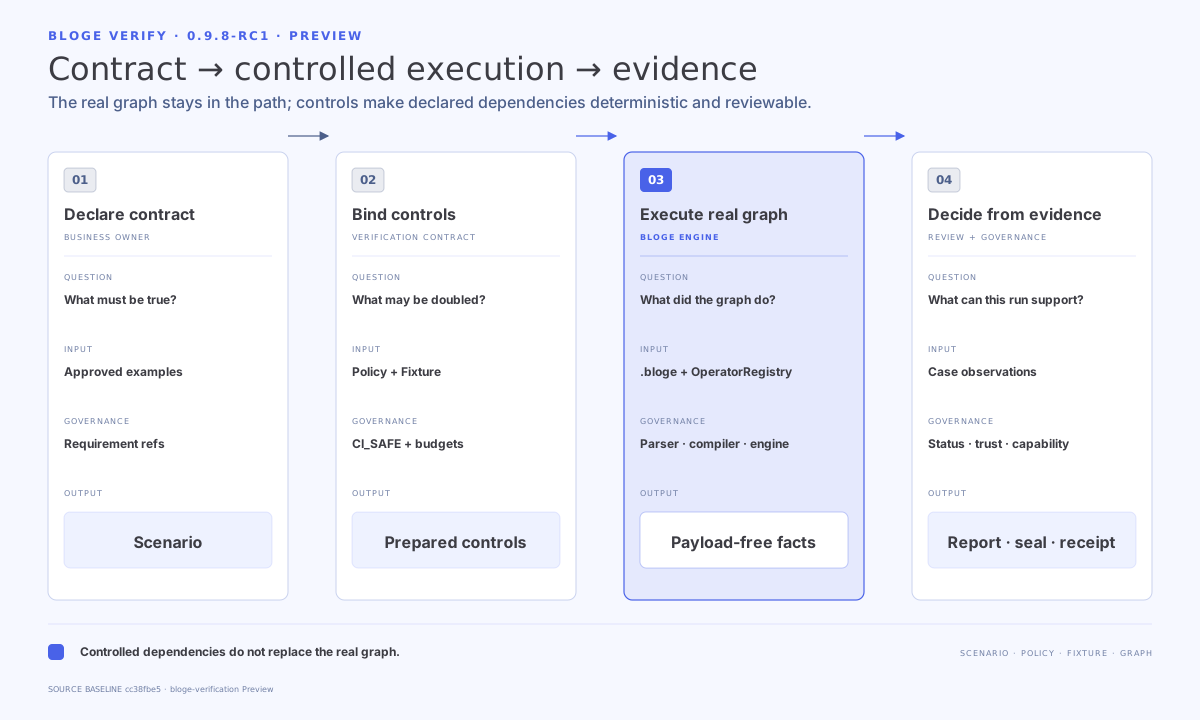
Run the maintained example
From a BLOGE 0.9.8-RC1 source checkout, verify the focused starter tests:
mvn -pl bloge-starter-loan-approval -am \
  -Dtest='LoanApprovalApplicationTest,LoanApprovalBusinessScenarioTest,LoanApprovalOperatorFlowTest' \
  -Dsurefire.failIfNoSpecifiedTests=false test
Expected result: both Suites and all seven business Cases pass. This path does not start Spring or call production services.
To observe a real manual task instead:
mvn -pl bloge-starter-loan-approval -am spring-boot:runOpen http://localhost:8080/bloge-console, claim the task as demo, and submit an approved or rejected decision.
Add the test dependency
Use the same BLOGE version property as the rest of your project:
<dependency>
  <groupId>com.leanowtech.bloge</groupId>
  <artifactId>bloge-verification</artifactId>
  <version>${bloge.version}</version>
  <scope>test</scope>
</dependency>
Build the smallest useful verifier
Start with one Suite, one Case, and one BUSINESS_OUTPUT expectation. Keep every Case isolated by returning a fresh VerificationEnvironment from the bootstrap.
ScenarioVerifier verifier = ScenarioVerifier.builder()
    .bootstrap(caseContext ->
        VerificationEnvironment.controlled(operatorRegistry))
    .projectRoot(projectRoot)
    .policy(projectRoot.resolve("src/test/bloge/verification-policy.yaml"))
    .build();

VerificationReport report = verifier.verify(
    projectRoot.resolve("src/test/bloge/scenarios/order.scenario.yaml"));

report.requirePass();
The customer OperatorRegistry is not replaced. Fixture rules control declared call sites or effect ports around the real graph execution.
Map a Scenario directory to JUnit
@TestFactory
Stream<DynamicTest> businessScenarios() {
    return BlogeScenarioTests.fromDirectory(
        projectRoot.resolve("src/test/bloge/scenarios"),
        verifier);
}
Directory discovery performs Suite, Case, Fixture, and Requirement preflight before creating dynamic tests.
Run the Maven Preview goals
Compile tests first so the plugin can load the customer bootstrap:
mvn test-compile bloge:verifyFor a supported direct-module Maven reactor:
mvn test-compile bloge:verify-reactorThese goals remain Preview in 0.9.8-RC1. Keep plugin and dependency versions aligned through the project version property instead of copying a release-specific goal coordinate into scripts.
Add evidence only after the first Case passes
For source-bound evidence, configure a clean Git worktree, an ignored output directory inside that worktree, sourceBoundEvidence(), and an execution profile. Keep the receipt outside the artifact directory; do not copy, migrate, or re-seal the artifact.
Then verify it with the matching evidence reader and pass the verified result to VerificationClaims.assess(...). Do not infer decision authority directly from JSON fields.
Replace the example with your domain
| Loan starter | Your project |
|---|---|
loan-approval.bloge | The real business graph |
| Loan Scenario files | Business-owner-approved Cases and expectations |
| Verification Policy | Minimum assurance and effect obligations |
| Starter operators | Customer operators registered for the graph |
| Starter bootstrap | A fresh controlled environment per Case |
Add failure, retry, compensation, and external-effect Fixtures one path at a time. Introduce project aggregation, durable plans, property runs, or release attestation only when the simpler Suite explains the intended business decision clearly.
Next
- API reference for entry-point selection.
- Capability matrix before using a result as a gate.
- Error reference when a run is not
PASS.