
BLOGE Verify User Guide
bloge-verification is the 0.9.8-RC1 Preview foundation for checking customer business correctness against a real BLOGE graph. This guide organizes the workflow around the decisions a team must make; the detailed Java surface, evidence formats, and reason codes live in focused references.
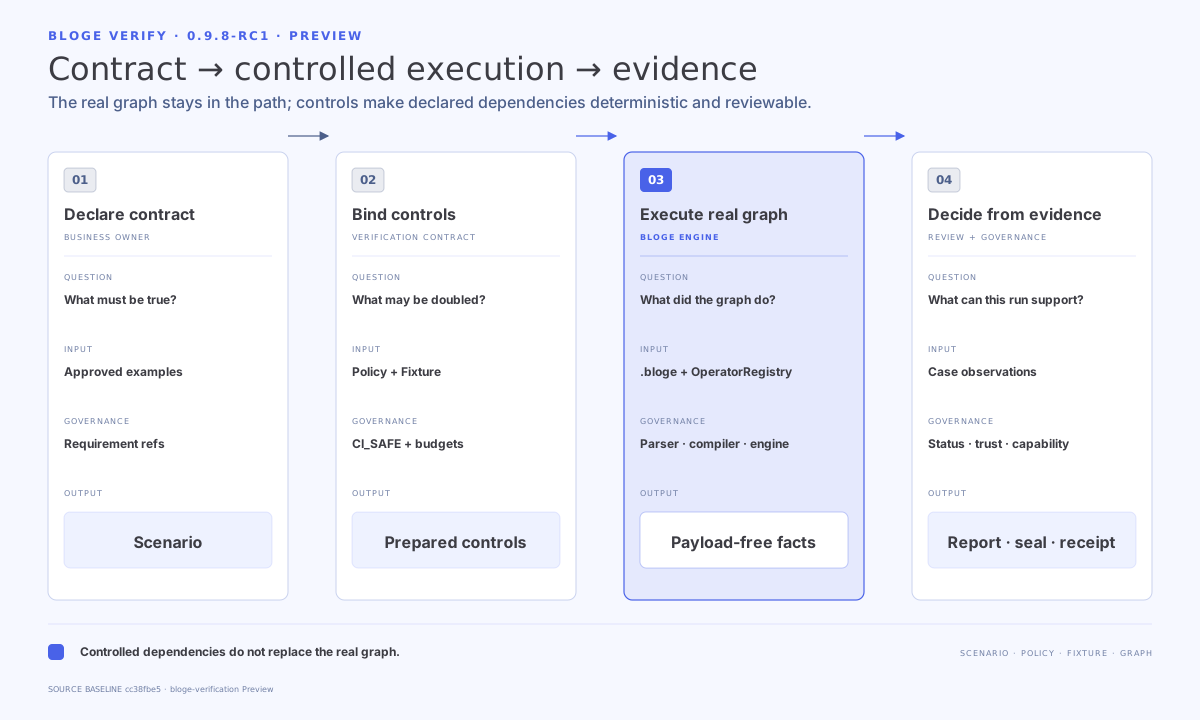
1. Define the business contract
A verification Suite starts from a business-owned question, not a technical test method. Give each Case a stable identity and declare only facts the business is prepared to approve.
| Contract | Owns | Keep explicit |
|---|---|---|
| Scenario | Inputs, Cases, expectations, Fixture references | Suite/Case IDs, graph, context, expected facts |
| Policy | Minimum assurance and obligations | Required Cases, expectations, effects, limits |
| Fixture | Controlled observations or responses | Call site or effect port, matching rules, consumption |
| Governance catalog | Requirement and Oracle selection | Version, partition, effective time, source digest |
Use YAML by default; equivalent JSON is accepted. Obtain schemas from the matching catalog rather than copying an old document shape.
2. Bind controls around the real graph
The bootstrap must return a fresh VerificationEnvironment for each Case. Register the same customer operators used by the graph. Controls sit at declared boundaries; they do not replace graph semantics.
Choose one Fixture plane deliberately:
| Plane | Use when | Identity basis |
|---|---|---|
NODE_CALL | A graph node invocation is the controlled boundary | Node/operator call site and input |
EFFECT_PORT | A declared external effect is the controlled boundary | Port descriptor, operation, and request |
Fail closed on unmatched or over-consumed rules. An undeclared effect is not silently converted into a harmless stub.
3. Execute and read the verdict
Use ScenarioVerifier for a Suite, BlogeScenarioTests for JUnit discovery, or a specialized runner for durable, project, reactor, and paired-toolchain work.
Read VerificationStatus first:
PASS: the declared execution and expectations completed successfully.FAIL: execution completed, but a business or Policy obligation failed.INVALID: the input or selected capability combination is invalid.INCOMPLETE: the required execution or evidence could not be completed.
Then inspect ordered reasonCodes, the first non-passing Case or action, and the relevant observation or counterexample. See Error reference.
4. Choose expectations and matchers
Start with a small set of stable business observations. Matchers should express business equivalence, not implementation detail.
| Expectation family | Typical use |
|---|---|
BUSINESS_OUTPUT | A graph result or selected business field |
BUSINESS_CONTRACT | A governed outcome bound to a Requirement and Oracle |
| Effect expectations | Whether declared external interactions occurred as required |
| Durable temporal expectations | State, suspension, signal, time, and resume behavior |
For sensitivity or Property verification, treat generated examples and mutations as explicit bounded evidence. Passing a finite cohort does not cover all possible inputs.
5. Verify retained durable workflows
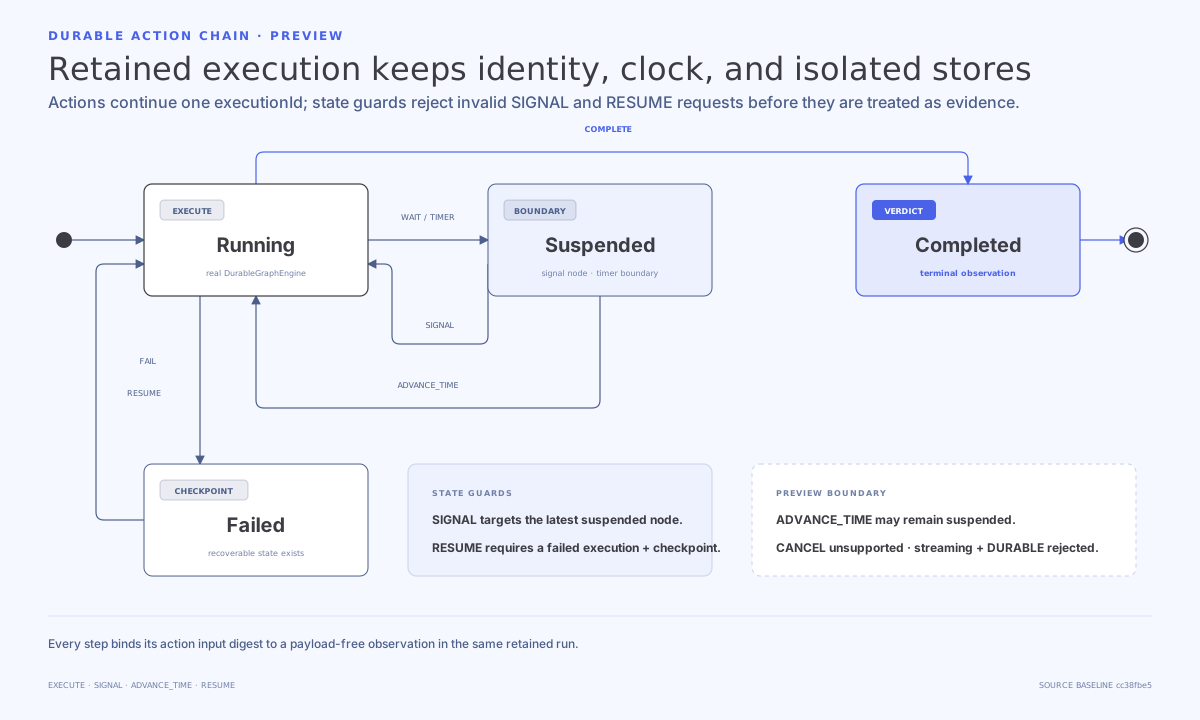
A durable plan is a finite action chain over one retained session:
| Action | Valid boundary |
|---|---|
EXECUTE | Starts or advances the graph from the supplied context |
SIGNAL | Targets the latest suspended node in the retained session |
ADVANCE_TIME | Moves the deterministic clock; the session may remain suspended |
RESUME | Resumes a failed execution only when a checkpoint exists |
CANCEL is not supported in this Preview slice. Streaming plus durable execution is rejected. A runner accepts one plan at a time; if customer code cannot stop after timeout, discard the poisoned runner instance.
Use v4 durable team evidence only when Policy continuity, replay assurance, effect provenance, and declared-port resolution are all complete. Lower durable versions remain useful but do not support the same claim.
6. Seal and verify evidence
Source-bound evidence requires all of the following:
- Run in the original clean Git worktree.
- Keep every declared source input tracked and unchanged.
- Write artifacts to an ignored, non-classpath directory inside that worktree.
- Preserve the original receipt outside the artifact directory.
- Use the matching reader to rebind the artifact to the current project root.
Do not copy, migrate, or re-seal an artifact and present it as the original. Readers reject unknown versions and projection drift instead of silently upgrading them. See Evidence versions.
7. Assess the decision capability
Pass the reader-verified result and exact receipt to VerificationClaims.assess(...). The returned ClaimCapability describes the strongest supported decision and includes cumulative missingEvidence.
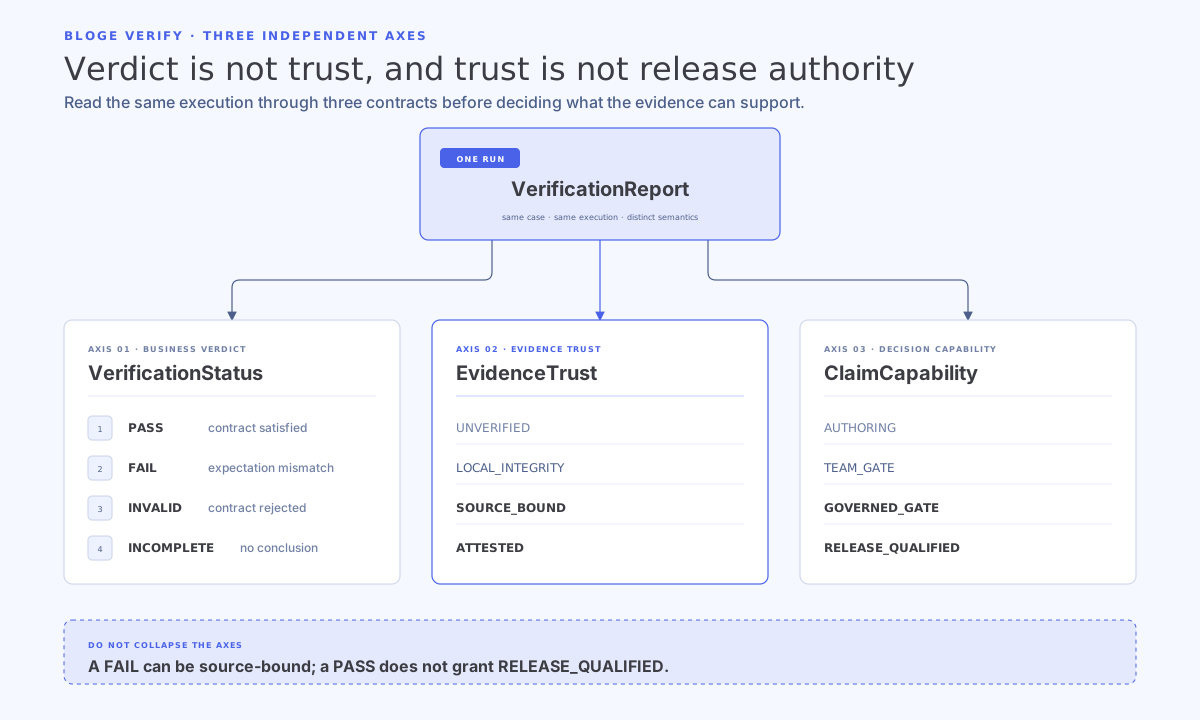
Project and reactor aggregates must own a complete child inventory from one cohort. External provenance and release attestations must bind exact receipt digests; BLOGE verifies signatures but does not create or hold the signer's private key.
Read the Capability matrix before using evidence as a team, governed, or release gate.
8. Evolve one axis at a time
Recommended progression:
- One local Suite, one Case, one business output.
- Failure and boundary Cases with controlled Fixtures.
- Source-bound Suite evidence and independent reader verification.
- Durable, Property, sensitivity, isolation, or Oracle evidence only for a concrete risk.
- Project or reactor aggregation when one decision genuinely spans multiple Suites or modules.
- External provenance and release attestation only when the governance owner and signing boundary are established.
Changing one axis at a time keeps failures attributable. A larger evidence bundle is not automatically a stronger business argument.
9. Reference map
- Getting started: runnable loan example and first integration.
- API reference: Java entry points, reports, SPIs, and schema catalogs.
- Capability matrix: supported gates and explicit non-claims.
- Evidence versions: artifact families, versions, readers, and catalogs.
- Error reference: status-led diagnosis and retry decisions.